Posts

Export the Schemas

 Export: ----------- When You perform Full export of database or Schema, you may need excluding some schemas or tables. Especially your database or Schemas are too big, probably you need to exclude some schemas or tables during full export of database or Schema export. You can add the EXCLUDE option to expdp command, EXCLUDE syntax: EXCLUDE=object_type[:name_clause] [, ...] expdp ... SCHEMAS=scott EXCLUDE=SEQUENCE, TABLE:\"IN ('EMP', 'DEPT')\" Exclude Table in Oracle For Example; Scenario 1: I want to export MSDB Schema , If I need full schema export , following command can perform this. expdp \"/ as sysdba\" directory=DATA_PUMP_DIR dumpfile=SchemaBackup%U.dmp schemas=MSDB logfile=SchemaBackup.log parallel=64 cluster=n Scenario 2: But,I want to Exclude Some tables from MSDB Schema, All tables except this excluded tables will be exported by using EXCLUDE option as follows. If you don’t use parfile ( parameter file ),you can get the quote marks errors ...

How INSERT Statement Works in Oracle

 How INSERT Statement Works in Oracle: 1.When Oracle receives sql/insert query,it requires to run some pre-tasks before actually being able to really run the query. 2.During parsing,Database validate the syntax of the statement whether the query is valid or not. 3.Database validate the semantic of the statement.It checks whether a statement is meaningful or not. 4.If syntax/Semantic check pass,then server process will continue execution of the query. The server process will go to the library cache.In the library cache the server process will search from the MRU (Most Recently Used) end to the LRU (Least Recently Used) end for a match for the sql statement. It does this by using a hash algorithm that returns a hash value.If the hash value of the query we have written matches with that of the query in library cache then server process need not generate an execution plan (soft parsing) but if no match is found then server process has to proceed with the generation of execution plan (h...

ADOP PREPARE phase, does a series of validations

 In the PREPARE phase, ADOP does a series of validations and then “prepares” the system for an online patching cycle. Here is a rundown of what happens step-by-step when we run adop phase=prepare First, it preforms the verification of parameters and checks for various minor pre-reeqs Performing verification of parameters Sourcing the Run Edition environment Validating system setup… Determining admin node Node registry is valid. Performing database sanity checks Acquire lock on sessions table Checking for pending adop sessions active hotpatch session… active cleanup session active FS_CLONE session Staging new adop session… Checking if node “<node_name>” previously failed New row inserted into ad_adop_sessions table with session id : 100 Unlocking sessions table createPatchCtxFile() check if patch context file exists, else generate it (from where?) Checking the status of phase select  count(1)   from  ad_adop_sessions  where  adop_session_id=100   ...

adcfgclone on database node we had three modes in R12

 adcfgclone on database node we had three modes in which it can be executed.   1)perl adcfgclone.pl dbTier:    It will configure the ORACLE_HOME on the target database tier node and  recreate the controlfiles.  This is specially used in case of standby database and/or hot backups. It will take care of all the steps.    2)perl adcfgclone.pl dbTechStack   It will configure the ORACLE_HOME on the target database tier node only. Relink the oracle home.   The below steps has to be performed manually 1. Create the Target Database control files. 2. Start the Target System Database in open mode 3. Run the library update script against the Database cd $RDBMS_ORACLE_HOME/appsutil/install/[CONTEXT NAME] sqlplus "/ as sysdba" @adupdlib.sql [libext]  Where [libext] should be set to 'sl' for HP-UX, 'so' for any other UNIX platform, or 'dll' for Windows.   3)perl adcfgclone.pl dbconfig   It is used to configure the database with  co...

Types of Standby Databases

 Types of Standby Databases: ======================= Physical Standby Logical Standby Snapshot Standby Active data guard 1.PHYSICAL STANDBY: 1.Physical Standby is the exact block-for-block copy of the primary database. 2.Physical standby database synchronized with the primary database through the application of redo data received from the primary database. 3.It can be used concurrently for data protection and reporting.    4.Physical standby database will be mounted stage while recovery is processed. 5.It can be opened as read-only mode 6.Active standby database is available for reading mode, enabling recovery at the backend.  Physical standby database benefits: 1.An identical physical copy of the primary database. 2.Disaster recovery and high availability. 3.High Data protection. 4.Reduction in primary database workload. 5.Performance can be Faster. 2.LOGICAL STANDBY: 1.A logical standby database does not have to match the schema structure of the source database. 2....
 ERROR: Concurrent program error-ed out with below error, Failed to write core dump. Core dumps have been disabled. To enable core dumping, try “ulimit -c unlimited” before starting Java again SOLUTION: Before: --------- [root@ ~]# ulimit -c -l core file size (blocks, -c) 0 max locked memory (kbytes, -l) 64 Here ulimit core file size is 0 so change it to unlimited. After: -------- [root@ ~]# ulimit -c unlimited [root@~]# ulimit -c -l core file size (blocks, -c) unlimited max locked memory (kbytes, -l) 64

database parameters recommendations

Image

Concurrent Managers Performance in E-Business Suite R12.1/R12.2

Best Practices for Performance for Concurrent Managers in E-Business Suite ============================================================== This Document contains 5 topics 1. Generic Tips 2. Transaction Manager (TM). 3. Parallel Concurrent Processing (PCP) Environment. 4. Tuning Output Post Processor (OPP). 5. Concurrent Processing Server Tuning. Generic Tips 1) Sleep Seconds - is the number of seconds your Concurrent manager waits between checking the list of pending concurrent requests (concurrent requests waiting to be started). A manager only sleeps if there are no runnable jobs in the queue. Tip: During peak time, when the number of requests submitted is expected to be high, Set the sleep time to a reasonable wait time(e.g. 30 seconds) dependent on the average run time and to prevent backlog. Otherwise set the sleep time to a high number (e.g. 2 minutes). This avoids constant polls to check for new requests. 2) Increase the cache size (number of requests cached) ...

What is the main difference between Lock , Block and Deadlock in oracle database:

What is the main difference between Lock , Block and Deadlock in oracle database: Answer : The Meaning of lock is : ======================== Lock is a done by database when any connection access a same piece of data concurrently. One connection need to access Piece of data . The Meaning of Block : ====================== It occurs when two connections need access to same piece of data concurrently and the meanwhile another is blocked because at a particular time, only one connection can have access. SQL knows that once the blocking process finishes the resource will be available and so the blocked process will wait (until it times out), but it won’t be killed. The Meaning of Deadlock : ========================= Deadlock occurs when one connection is blocked and waiting for a second to complete its work, and this situation is again with another process as it waiting for first connection to release the lock. Hence deadlock occurs. Example : i have 2 processes. P1 ...

Useful Metalink Doc id for Oracle Apps and Core DBA

Useful Metalink Doc id for Oracle Apps and Core DBA : ============================================= R11i / R12: Component Version In Oracle Applications (Doc ID 1327288.1) How to Replace Oracle Logo with Company Logo on Applications 11i Sign-On Screen (Doc ID 119319.1) How To Set Concurrent Program To Run Exclusively From A Custom Manager (Doc ID 2268941.1) How to Create a Custom Concurrent Manager (Doc ID 170524.1) Cloning Oracle E-Business Suite Release 12.2 with Rapid Clone (Doc ID 1383621.1) How to Recover from a Lost or Deleted Datafile with Different Scenarios (Doc ID 198640.1) How To Change Log Archive Destination While the Database Is Open When the Archive Destination Is Full (Doc ID 160446.1) 12.2 E-Business Suite Applications DBA Steps To Create, Update or Rebuild The Central Inventory For Oracle Applications (Doc ID 1588609.1) E-Business Suite - ADOP Basic Usage Training Videos [Video] (Doc ID 2103131.1) How to Change IP Address in an Oracle Applicatio...

Gather Schema Statistics R12.1/R12.2:

Gather Schema Statistics R12.1/R12.2: ==================================================== What is Gather Schema Statistics? Gather Schema Statistics program generates statistics that quantify the data distribution and storage characteristics of tables, columns, indexes, and partitions. The cost-based optimization (CBO) uses these statistics to calculate the selectivity of prediction and to estimate the cost of each execution plan. Why Run the Gather Schema Statistics? When Data is update, insert, delete in table of user end Like (Technical User ,Finance User ,Ect) It become necessary to run the Gather Schema Statistics It’s recommended to Run GSS in Weekly Once or twice. How to run Gather Schema Statistics? Login application with sysadmin user Submit Request Window Navigate to: Concurrent > Requests Enter the parameters This can be run for specific schemas by specifying the schema name or enter ‘ALL’ to gather statistics for every schema in the database Submit the Gather...

Oracle E-Business Suite Release 12.2.8 Readme (Doc ID 2393248.1)

Oracle E-Business Suite Release 12.2.8 Readme (Doc ID 2393248.1): ======================================================== Section 1: Preparation Section 2: Obsolete Products in Release 12.2.8 Section 3: Upgrade Database to 11.2.0.4 or higher Section 4: Apply Required Database Patches and Update Database Initialization Parameters 4.1 Apply Required Database Patches 4.2 Set Database Parameter (Conditional) Section 5: Apply Consolidated Seed Table Upgrade Patch (Required) Section 6: Apply the Latest AD and TXK Delta Release Update Packs Section 7: Perform Pre-Update Steps (Conditional) Section 8: Apply Oracle E-Business Suite 12.2.8 Release Update Pack 8.1 Path A — Upgrade and New Installation Customers upgrading to Oracle E-Business Suite 12.2.8 Release Update Pack 8.2 Path B — Existing Customers (Release 12.2.2, 12.2.3, 12.2.4, 12.2.5, 12.2.6 or 12.2.7) upgrading to Oracle E-Business Suite 12.2.8 Release Update Pack Section 9: Post-Update Steps Section 10: Apply Additional Critical...

Oracle Database 11g /12c Exam Codes :

Oracle Database Exam Codes : -------------------------------------------------------------------------- Oracle Database 11gR2 : Oracle Database 11g: Administration II | 1Z0-053 Upgrade Oracle9i/10g to Oracle Database 11g OCP | 1Z0-034 Oracle Database 11g: New Features for Administrators | 1Z0-050 Oracle Database 11g: Administration I | 1Z0-052 Oracle Database 11g: Performance Tuning | 1Z0-054 Oracle Database 11g: Program with PL/SQL | 1Z0-144 Oracle Database 12cR1 : ================== Upgrade to Oracle Database 12c | 1Z0-060 Oracle Database 12c: SQL Fundamentals (retiring November 30, 2019) | 1Z0-061 Oracle Database 12c Administration | 1Z0-062 Oracle Database 12c: Advanced Administration | 1Z0-063 Oracle Database 12c: Performance Management and Tuning | 1Z0-064 Oracle Database 12c: Data Guard Administration | 1Z0-066 Upgrade Oracle9i/10g/11g OCA to Oracle Database 12c OCP | 1Z0-067 Oracle Database 12c: RAC and Grid Infrastructure Administration | 1Z0-068 Oracle Database 12c...

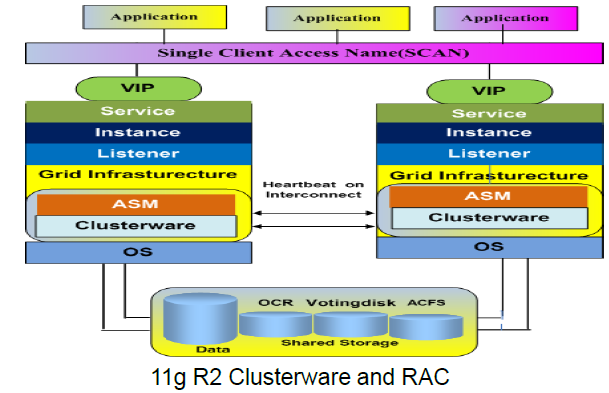
11GR2 RAC Architecture

Image

10g/11g database architecture

Image
10g/11g database architecture

RAC Node Eviction and Wait Events

Image

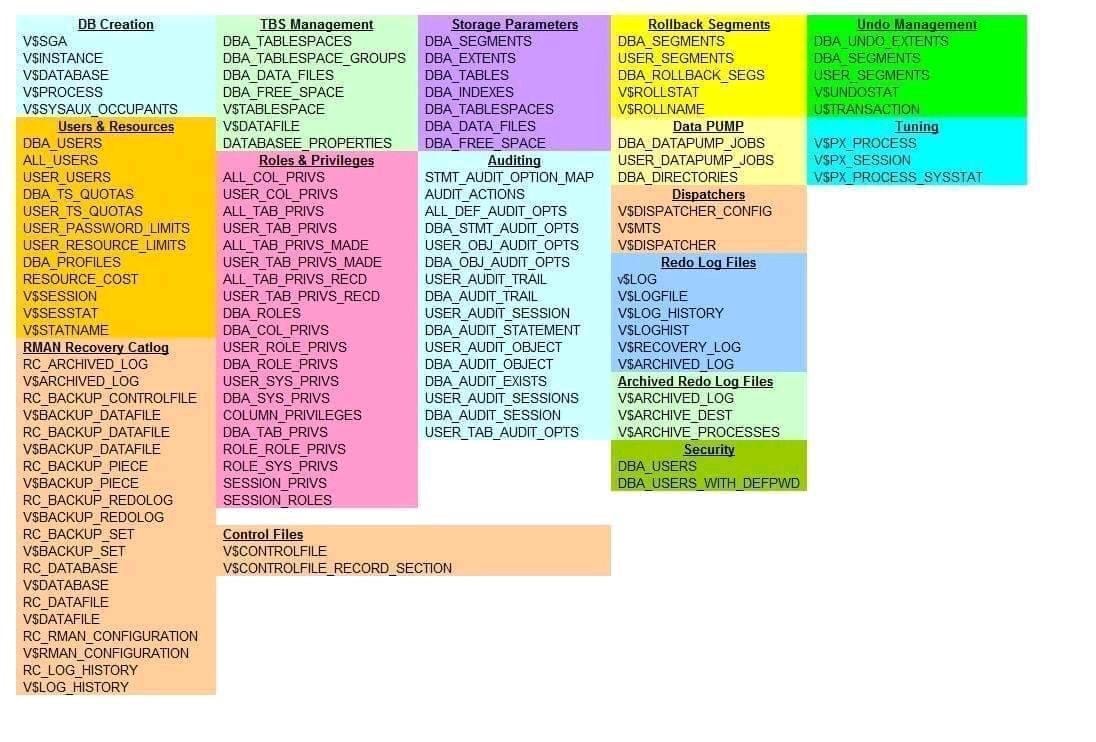
DBA Views

Image

RCONFIG Overview

RCONFIG Overview : ============================== RCONFIG is a non interactive command line utility for converting a Single-Instance database to RAC database.It is installed by default as a executable file under $GRID_HOME/bin and $ORACLE_HOME/bin. It takes XML file as input and process the conversion procedure. Benefits of using RCONFIG : --------------------------------------- It’s very light and easy to use utility for conversion of Single Instance database to RAC database . We do not need to do additional configuration , as it comes by default. It also provide testing capabilities in advance without actually converting it into RAC. It is fully automated conversion process. It has ability to migrate non-ASM DB to ASM file-system It creates RAC DB instance on all the specified nodes. It registers CRS resource to the cluster. It startup RAC database instances on the specified nodes. Disadvantage of using RCONFIG : ---------------------------------------------- Database do...

SQL Server DBA Duties DAILY

SQL Server DBA Duties DAILY : ============================================ Action: Check Network Connectivity Reason: To check that hardware & server is up. To check that IP address & name have not been changed. Gives early warning if server fails. Checks IP address & name resolution (sometimes a problem with wins, dns, lmhosts). Method: 1. Ping sql servers every 15 mins with IP Sentry. 2. Use batch file to ping servers. 3. Use a server monitoring tool. Action: Check SQL services Reason: To check that SQL server is available. To check MSSQLserver & SQLexecutive/agent, DTS services are running. To check that we can connect. Method: SEM: Green lights if SEM, or connect to each server by clicking on the ‘+’ for each server & open sql executive. Action: Check Scheduled Tasks/ Jobs Reason: Backups, DBCC checks, etc. are run overnight as scheduled tasks. Method: SEM: Highlight server, servers | scheduled tasks Action: Check dba_tools..scheduledtasklog Reason:...

OLSNODES provides information related RAC nodes:

OLSNODES provides information related RAC nodes: ================================================ 1. List of nodes in the cluster olsnodes prod54-1 prod55-1 2.Nodes with node number olsnodes -n prod54-1 1 prod55-1 2 3.Node with vip olsnodes -i prod54-1 prod54-1-vip prod55-1 prod55-1-vip 4. Nodes with status olsnodes -s -t prod54-1 Active Unpinned prod55-1 Active Unpinned 5.Leaf or Hub olsnodes -a prod54-1 Hub prod55-1 Hub 6.Getting private ip details of the local node olsnodes -l -p prod54-1 162.168.1.1,162.168.2.1 7. Get cluster name olsnodes -c prodd-cluster